

Getting an LLM to correctly write Microsoft Graph code for Exchange Online that uses singleValueExtendedProperties is notoriously hit-or-miss Even as models improve and context windows grow and AI gets smarter, the legacy quirks of these properties usually derail the generator—skewing the output into either hallucinated or inefficient logic or broken syntax. While the latest models can usually come up with the correct answer eventually there is nothing worse the blowing your whole token budget for the day on something that could be improved with the correct context. Or more frustratingly continuing to see the same error or issue happen anytime you ask AI to include extended properties in a piece of code you ask it to generate.
This became the premise for this post—a topic I initially thought would be straightforward, as it stems from a common personal frustration of mine when using any of the big four LLMs. Like any content I write, I’ve tried to apply a degree of engineering rigor. Nobody is an expert in everything, but having measurable data points makes the content much more useful. While I was finishing up this post i read this blog post https://www.jsnover.com/blog/2026/07/20/llm-models-are-bullshit-engines from Jeffrey Snover (the PowerShell guy) which made sense of some of what I battled with over the last few weeks working on this post. I thought about trashing the draft as I started second guessing what I wrote, but I think Jeffrey’s post was at the heart of why some much AI content that is suppose to teach you about AI is BS. I wonder what we can do in the tech community to make AI related content better and more engineering focused rather then just “content creation”.
Generally In engineering, the principle of measurability dictates that a system, process, or physical property must be quantifiable using objective metrics and standard, verifiable tools. It ensures that performance, tolerances, and success criteria are based on exact facts rather than subjective assumptions.
In the LLM world, two of the ways of adding a level of control to the output are Explicit Priming and Recency. Measuring the effects of these is challenging, as none of the major LLM chat products expose attention weights through their consumer or API interfaces. Because you can't directly inspect 'what the model attended to' the way you could with an open-weight model loaded locally, measurability becomes a black-box behavioural measurement (does the output change?), rather than a direct one.
The goal of this post is to craft effective contexts—using Explicit Priming, Recency, or both—that you can include in your AI prompts or skill files to generate better Extended Property code with fewer tokens. While token usage naturally scales with code verbosity, the real token sink comes from repeatedly asking an AI to fix broken output. If an LLM can produce more accurate content then token economy usually looks after itself as you avoid costly correction loops. Let’s dive into the common issues.
Issue 1 Property ID Normalization of SinglevalueExtendedProperties
This is an example script that two separate LLM’s Produced based on the following prompt
Write a simple PowerShell script using the Microsoft Graph PowerShell sdk the gets the PidTagSubject,PidTagMessageClass,PidTagMessageFlags and singlevalueextendedproperty and display it in the console. It should enumerate all the items in the inbox folder
Connect-MgGraph -Scopes "Mail.Read"

# Extended property IDs
$subjectPropertyId      = "String 0x0037"   # PidTagSubject
$messageClassPropertyId = "String 0x001A"   # PidTagMessageClass
$messageFlagsPropertyId = "Integer 0x0E07"  # PidTagMessageFlags

$expand = @"
singleValueExtendedProperties(`$filter=
    id eq '$subjectPropertyId' or
    id eq '$messageClassPropertyId' or
    id eq '$messageFlagsPropertyId')
"@ -replace "`r|`n",""

$messages = Get-MgUserMailFolderMessage `
    -UserId "me" `
    -MailFolderId "Inbox" `
    -All `
    -Property Id `
    -ExpandProperty $expand

foreach ($message in $messages) {

    $props = @{}
    foreach ($prop in $message.SingleValueExtendedProperties) {
        $props[$prop.Id] = $prop.Value
    }

    $subject      = $props[$subjectPropertyId]
    $messageClass = $props[$messageClassPropertyId]
    $messageFlags = $props[$messageFlagsPropertyId]

    Write-Host "Subject      : $subject"
    Write-Host "Message Class: $messageClass"
    Write-Host "Message Flags: $messageFlags"
    Write-Host ("-" * 60)
}
While this generated script looks correct at first glance, it is broken due to how Microsoft Graph handles OData Property ID Normalization (also known as hex identifier canonicalization). (also the -Userid “me” is blatant error that every LLM recently started to do)
The trap lies in the mismatch between what you request and what Graph actually returns. For example, when you request this:
singleValueExtendedProperties($filter=id eq 'String 0x0037' or id eq 'String 0x001A' or id eq 'Integer 0x0E07')
Graph accepts the query, but normalizes the property IDs in the JSON payload it sends back. Instead of matching your exact input, it strips the leading zeros and returns this:
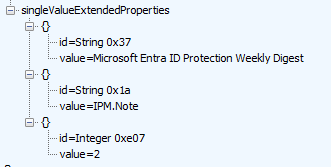
To fix this issue you need to provide a small amount of context information (this would be an example of Explicit Priming) to the LLM so it will then write code that process the output correctly eg
Graph returns extended property ids in canonical form (no leading zeros —
0x0037comes back as0x37); never string-compare ids, always normalize the hex tag to an integer before matching, and note that absent properties are omitted from the array entirely rather than returned as null."
Other context that’s useful is
use a PageSize of 999 and only select the properties need
Doing some blind anonymous tests and tweaking the context until I can get this to work on Grok, Gemini, Claude and ChatGpt seemed to work okay. The above context could also be rewritten set of rules that would make it more Receney orientated
Issue 2 Formatting and understanding Tagged and NamedProperites
The other one LLM’s get wrong from time to time is the formatting of Mapi properties. With Extended properties in Graph, EWS and Mapi there are two types you will deal with
Tagged Properties
Named Properties (for which there are two subtypes Lid and Name)
A lot of the time when you prompt an LLM around extended properties you might use the canonical property name in your prompt like PidTagMessageClass
https://learn.microsoft.com/en-us/office/client-developer/outlook/mapi/mapi-canonical-properties this isn’t usable in code and must be translated to the actual property format which will vary based on the type of property.
Here’s and example of an AI explaining why it was correct in giving me the wrong property definition PidLidAddressCountryCode
***Incorrect**Short Answer:
Integer in the property ID refers to how the property is identified (by a numeric LID).
The value of the property is a string (PT_UNICODE).
Detailed Explanation
PidLidAddressCountryCode is a named property in MAPI, defined as:
Property Set: PSETID_Address → {00062004-0000-0000-C000-000000000046}
LID (Long ID): 0x80DD
Data Type: PT_UNICODE (string)
When using Microsoft Graph, you identify named properties using one of these two formats:
Integer {GUID} Id {hex-number} ← This is what we use
String {GUID} Name {string-name}
Because this property has a numeric identifier (0x80DD), Microsoft Graph expects the Integer ... Id ... format.
The word Integer here does not describe the data type of the value — it describes the type of identifier used to reference the property.
In this instance, the model identified the correct data type (a string) but failed to construct the property identifier correctly—relying instead on probabilistic guessing. Here, the underlying complexity of Extended Properties simply exceeded the LLM's capabilities. To fix this, I created a context block leveraging both Explicit Priming and Recency—or at least the closest approximation possible, given that an LLM's black-box nature limits how precisely we can direct its attention.
# MS Graph Extended Properties Context
**Data Types (T):** String, Integer, Long, Short, Double, Float, Boolean, Binary, SystemTime, CLSID, Currency, Byte. (Append `Array` for multivalue).
**ID Formats & MAPI Canonical Mapping:**
- Tagged (`PidTag*`): `{T} 0x{PropId}` (ex: `String 0x0037` for PidTagSubject)
- Named LID (`PidLid*`): `{T} {GUID} Id 0x{Li
(ex: `String{00062002-0000-0000-C000-000000000046} Id 0x8205`)- Named String (`PidName*`): `{T} {GUID} Name {PropName}` (ex: `String {00020329-0000-0000-C000-000000000046} Name Keywords`)
-Graph exposes two separate collections: `singleValueExtendedProperties` and `multiValueExtendedProperties`. The type suffix determines which one a property lives in — any `{T}Array` id belongs to the multi-value collection, all others to the single-value collection. They are distinct navigation properties: each must be expanded/requested independently and cannot be combined in a single expand filter. Requesting an id through the wrong collection for its type returns nothing — no error is raised.
**Rules:**
1. Tagged (0x0001-0x7FFF): Prop ID only. NO type suffixes (use `0x001A`, NOT `0x001A001F`). NO GUIDs.
2. Named (>=0x8000): MUST use GUID + Id/Name formats.
3. Graph returns extended property ids in canonical form (no leading zeros — 0x0037 comes back as 0x37); never string-compare ids, always normalize the hex tag to an integer before matching, and note that absent properties are omitted from the array entirely rather than returned as null.
How to you use these contexts
How you use these contexts depends on the LLM you're using (e.g., context files, CLAUDE.md, etc.), but the simplest approach is just to include them directly in your prompt. Yes, that will cost tokens on the input side, but when you compare input versus output pricing, it's hardly relevant—especially if it's something that saves you from asking the LLM to rewrite code it didn’t understand in the first place.
Conclusion
LLMs are imperfect, black-box systems where logic exists in shades of grey. This is a far cry from the documentation, blog posts, and peer debates on Stack Overflow and NNTP groups before them that make up their current training data. While I’m just looking through a very narrow window of extended properties which LLMs constantly fail to deal with correctly, it’s a good example: when things don’t work for LLMs, it can be more economical to consider the engineering context rather than just relying on the LLM’s statistical models to guess the correct answer based on whatever small amount of real language context you might prompt it with (e.g., sycophancy) or retrieval-augmented correction where you point to an authoritative source, which for a lot of new subjects is starting to decline.